
How to mine sentences from anime & YouTube to Anki
Sentence mining is the most reliable way to turn the Japanese you watch into long-term memory. Instead of grinding a generic word list, you collect the exact sentences you meet in shows, podcasts and YouTube videos and study the words in context. This guide walks through a free, browser-based workflow: tap an unknown word in a subtitle line and ship a finished Anki card with reading, meaning, audio and a screenshot.
What sentence mining is (and why i+1 works)
A good mining card is built around one unknown word in an otherwise understood sentence — an i+1 sentence (everything you know, plus one new thing). The familiar grammar, topic and situation give the new word somewhere to attach, so it sticks far better than isolated vocabulary: you recall a meaning your brain already has a slot for.
The rule of thumb: if a sentence has two or three words you don't know, skip it — it's not yet i+1, and the card will be hard to review.
The free toolchain
You need three free pieces:
- Yomu — the free, no-account userscript: popup dictionary, subtitle overlay and the "mine" button.
- Anki — the spaced-repetition app, free on desktop.
- AnkiConnect — a free Anki add-on that lets Yomu push cards into your deck automatically.
Prefer Jiten or JPDB? Yomu mines there instead — same tap-to-card flow, different destination. Pick whichever you review in daily.
Workflow on YouTube
The fastest place to start, with nothing to download.
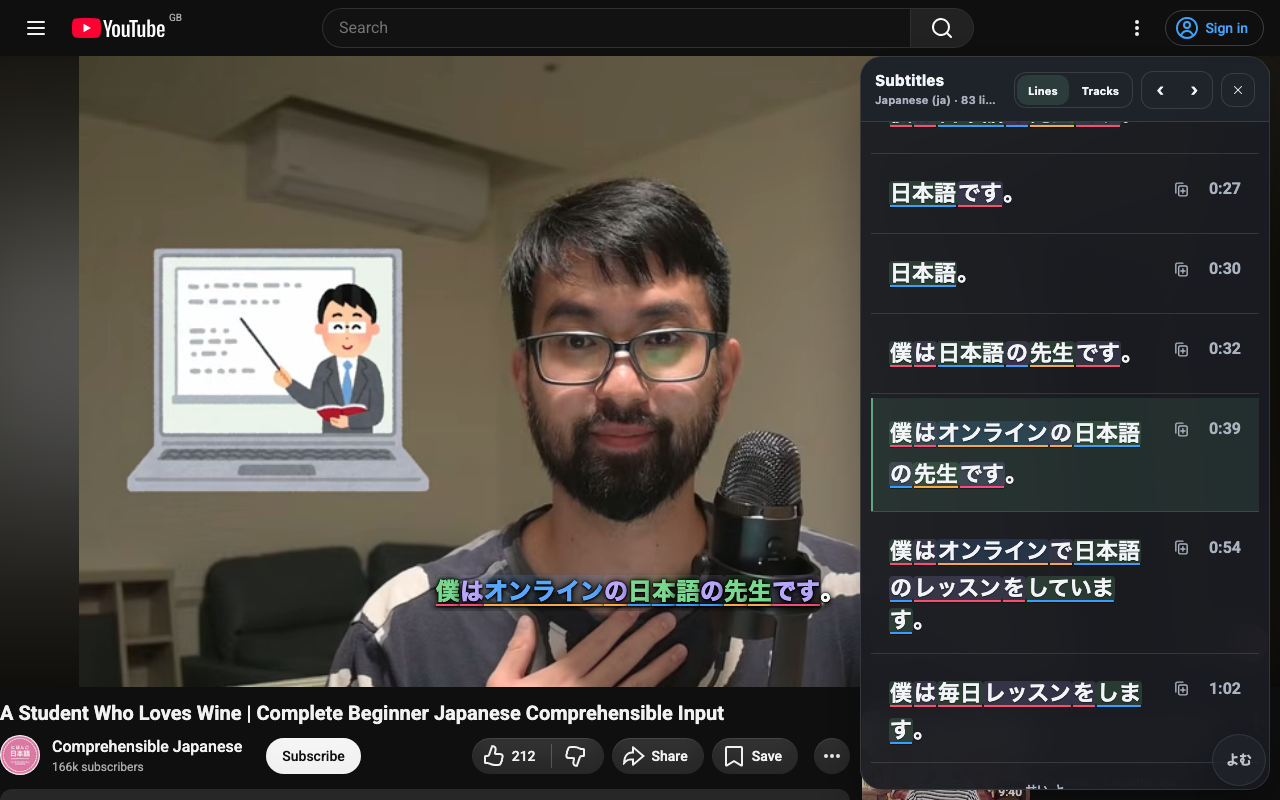
- Install Yomu and open a Japanese video. The Japanese subtitle reader overlay turns each subtitle line into tappable words, with an optional second line for your native language and a transcript panel beside the video.
- When a line lands at i+1, tap the one unknown word. The popup shows its reading, meaning, pitch accent and frequency.
- Hit mine. Yomu captures the whole subtitle line as the source sentence, pulls the word and reading, and — if you've enabled it — grabs the audio and a screenshot of the frame.
Workflow on your own video files
For anime episodes, drama or anything with a local subtitle file, use the free hosted Yomu video player — no desktop app required. Open your video and its .srt/.ass subtitle file in the browser and you get the same overlay, transcript panel and mining flow. Prev/next-line and copy/mine shortcuts let you scrub to the exact line and card it without touching the mouse.
What ends up on the card
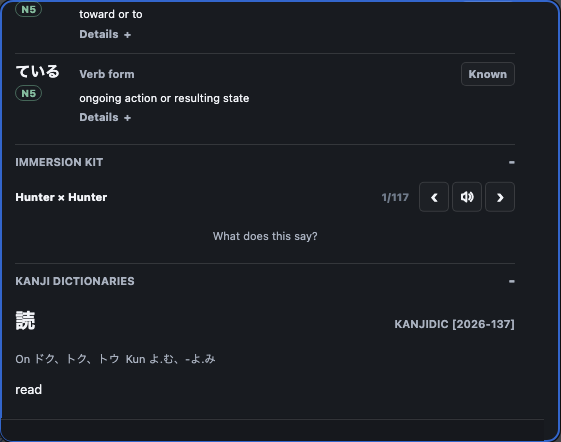
A mined card carries the pieces you need to recall the word in context:
- Word and reading (with furigana).
- Meaning — from Jiten, JPDB, and any Yomitan dictionaries you've imported.
- Source sentence — the full subtitle line it came from.
- Audio — pronunciation of the word, and where available the sentence audio.
- Image — an optional screenshot of the video frame for a visual cue.
You can trim fields to taste in your Anki note type; Yomu just fills what your card asks for.
Tips that keep mining sustainable
- One unknown word per card. If you find yourself adding glosses for two words, the sentence isn't i+1 yet.
- Don't over-mine. Ten to twenty good cards from a session beats fifty you'll dread. The bottleneck is reviews, not collection.
- Review daily. Mining without review just makes a backlog. Even ten minutes a day keeps the queue honest — the new-tab study page is a low-friction place to do it.
- Keep cards short. Long sentences with multiple clauses are harder to recall than the single line that taught you the word.
This is a free alternative to the paid mining suites — the same subtitle-to-card loop in your browser, with Jiten, JPDB, and Anki as optional targets. See the Migaku comparison.
Mining from phone or iPad
AnkiConnect lives on a desktop copy of Anki, so mobile mining sends cards to your computer over the local network. The getting started guide covers the full mobile-Anki setup (point Yomu's AnkiConnect address at your machine on the LAN, or via Tailscale away from home); cards mined on the phone then land in the same deck you review on desktop.
FAQ
What is sentence mining? Turning real sentences you meet while watching or reading Japanese — the ones with a single unknown word — into flashcards, so the new word is learned in context. See the section above.
Do I need a paid app to mine sentences? No. Yomu is free and browser-based; paired with Anki and the free AnkiConnect add-on it gives a complete subtitle-to-card workflow, with Jiten and JPDB as optional targets.
Can I mine sentences to Anki on my phone or iPad? Yes — Yomu on your phone sends cards over the local network to a desktop copy of Anki running AnkiConnect. See Mining from phone or iPad above and the getting started guide.