
Kanji Stroke Order & Drilldown
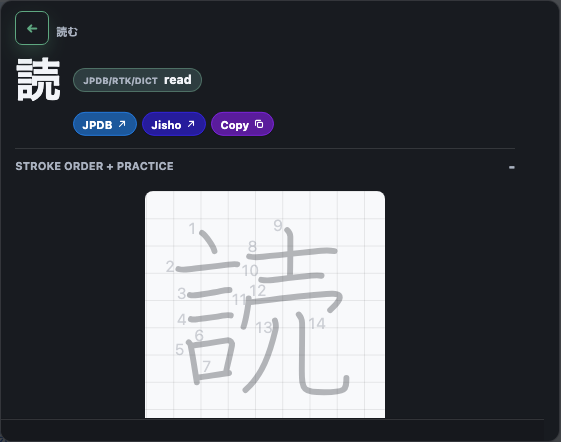
When a kanji stops you, you want more than a single reading — stroke order, the readings, what level it's at, and which words use it. よむ puts all of that one click away, free and without leaving the page.
What the kanji panel shows
Click a kanji inside the popup headword and the drilldown opens. Depending on your settings and imported data, it can show:
- Animated stroke order via KanjiVG — watch the correct stroke sequence, then trace it yourself on the built-in pad.
- Stroke count, grade, and JLPT level for placing the kanji.
- Readings (on'yomi and kun'yomi).
- RTK data for Remembering the Kanji users — keyword and frame.
- Component hints so you can see what the kanji is built from.
- Related words that use the kanji, so you learn it where it actually appears.
Kanji origin sources are modular and license-aware: you can turn optional public sources on or off independently.
Why stroke order in context beats a kanji dictionary
A standalone kanji dictionary makes you stop reading, switch apps, and search. よむ keeps you in the sentence: meet the kanji in a real word, break it down, optionally practice writing it, and keep going — which sticks better than drilling a list.
Set it up
- Install the free よむ userscript (see the setup guide).
- Open a Japanese page and tap a word that contains kanji.
- Click the kanji in the popup headword to open the drilldown.
Questions
Where does the kanji data come from? Open sources such as KanjiVG. Optional public sources are modular and license-aware — turn each on or off independently.
Does it show JLPT level and RTK data? Yes, when those sources are enabled — along with readings, components, and related words.