
Japanese Subtitle Miner & Video Reader
Video is some of the best Japanese input you can get — if you can actually read the subtitles. よむ turns Japanese subtitle lines into the same tappable text as a normal page: look up a word, read the whole line, and save the sentence, with no separate app. Free, no account.
A subtitle overlay built for reading
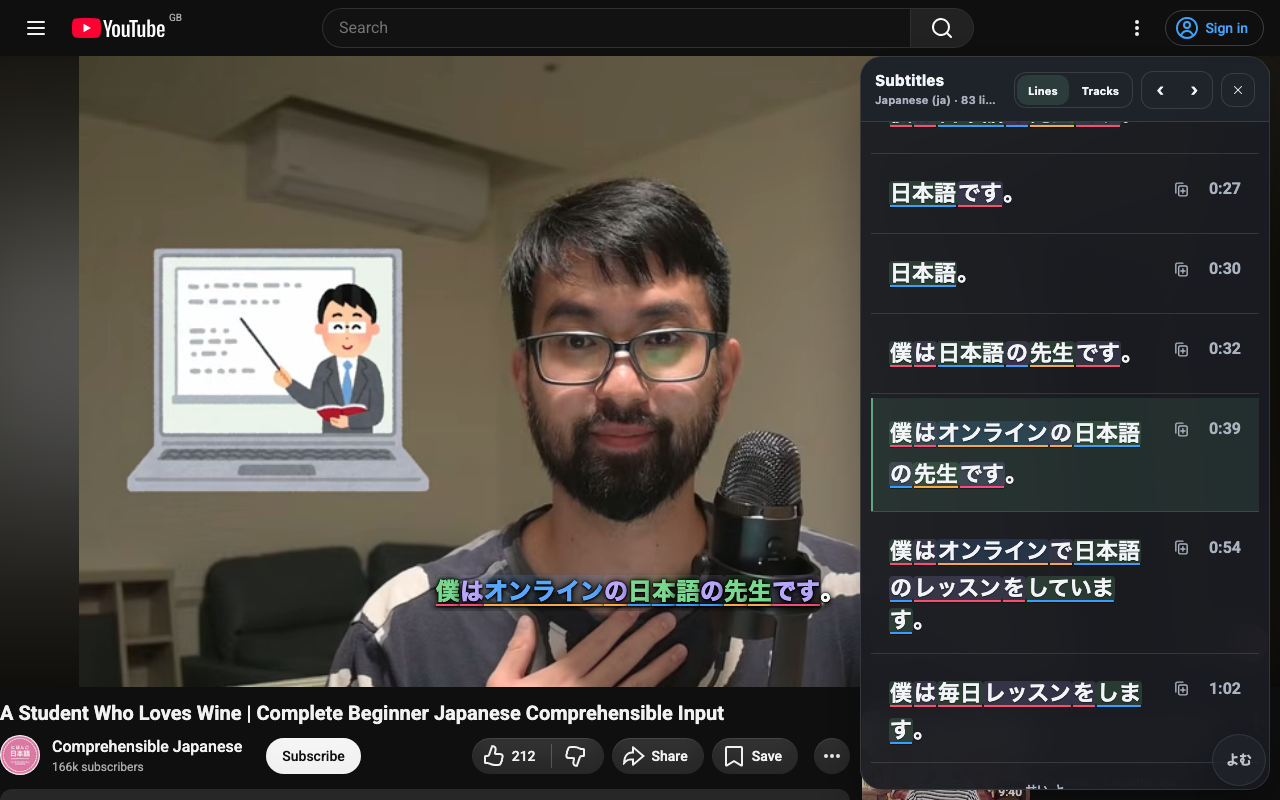
よむ adds an ASB-style subtitle overlay to video pages:
- Tappable Japanese lines — every subtitle word opens the popup dictionary.
- A second language track — show a native-language subtitle line underneath for support.
- A transcript panel — dock it left, right, or below the video. The active line highlights as it plays, and visible lines are hydrated into the same lookup words, so you can skim, jump to a line, and open a popup without leaving the video.
- Shortcuts — previous subtitle, next subtitle, copy subtitle, and mine. The panel can be set to open only while the video is paused, and becomes a bottom sheet on phones so the video stays usable.
Your own video files, no desktop app
For local files, open the free Yomu video player, drop in a browser-supported video, and use the Subtitles button to add Japanese or native subtitle files. The page creates normal browser video and text tracks, so the same overlay and transcript tools work without a desktop bridge.
Sentence mining to Jiten, JPDB, or Anki
From a subtitle line you can:
- Mine to Anki — with AnkiConnect reachable, よむ builds a card with the word, reading, meaning, the source sentence, audio, and an optional screenshot.
- Mine to Jiten or JPDB — add the word, mark it, or send a review grade.
asbplayer-style sentence mining, but in the same popup as your dictionary, kanji, and audio.
Set it up
- Install the free よむ userscript (see the setup guide).
- Open a Japanese video, or open the Yomu video player and load a file.
- Open the subtitle controls, turn on the transcript panel, and tap a word.
Questions
Does it need a desktop app like asbplayer? No — the overlay runs on YouTube, and the in-browser video player handles your own files without a desktop bridge.
Can I mine sentences to Anki? Yes — with AnkiConnect reachable, a subtitle line becomes a card with sentence, audio, and image.
Related guide: How to mine sentences from anime & YouTube to Anki.