
Yomitan vs Jiten vs JPDB vs Anki: which to use when
Anyone around Japanese immersion has seen these names — Yomitan, Jiten, JPDB, and Anki — and wondered whether they need all four or which to start with. They do different jobs, overlap a little, and you can use one, two, or all four. This page explains what each is, gives a plain "use this when…" rule, and shows how the free よむ reader lets you use any of them from a single popup.
What each tool actually is
Yomitan — the popup dictionary
Yomitan is a free, open-source popup dictionary. You import dictionary files (JMdict, frequency lists, pitch-accent data, and so on), then hover or tap Japanese text to see the reading, meaning, and other entries instantly. It is brilliant at one thing: getting a definition in front of you the moment you need it.
What it is not is an SRS. Yomitan shows you a word; it does not schedule that word to come back for review. That is by design — it is a lookup tool, and a very good one.
Jiten — a Japanese dictionary and review source
Jiten is a Japanese-focused dictionary and study system. It gives よむ another source of word status, definitions, audio, kanji facts, and review actions. If you already track words in Jiten, よむ keeps that workflow close to the page you are reading instead of forcing a separate lookup tab every time.
JPDB — a Japanese-tuned SRS with decks and word states
JPDB is a spaced-repetition system built specifically for Japanese. It ships prebuilt decks (including decks for specific anime, novels, and games), tracks frequency, and keeps a state for every word — new, learning, known, and so on. Because the decks and grading are already tuned for Japanese, you can get reviewing quickly without designing cards yourself.
Anki — a general-purpose SRS you fully control
Anki is a general-purpose SRS. You own the note types, the card templates, and the scheduling. That flexibility is its strength: you can build exactly the cards you want (sentence cards, audio cards, image cards) and they are yours forever, synced across devices. The trade-off is more upfront setup than Jiten or JPDB.
A quick comparison
| Yomitan | Jiten | JPDB | Anki | |
|---|---|---|---|---|
| Main job | Look words up | Dictionary-backed word study | Review words (Japanese-tuned) | Review anything (you build it) |
| Type | Popup dictionary | Japanese dictionary + study state | SRS + decks + frequency | General SRS |
| Setup effort | Import dictionaries once | Low — connect an API key | Low — prebuilt decks | Higher — your own note types |
| You own the cards | n/a (it is a dictionary) | Tracked on Jiten | Tracked on JPDB | Yes, fully |
| Account needed | No | Yes | Yes | Optional (local works) |
This table is about fit, not "better" — each is excellent at the job it was built for.
Which to use when
- You just want to read and understand. Start with a dictionary. In よむ that means importing a Yomitan dictionary / JMdict so lookups work locally.
- You already use Jiten for study. Connect Jiten so よむ can show its word state, definitions, audio, kanji data, and review actions in the popup.
- You want fast, low-effort reviews tuned for Japanese. Reach for JPDB. The prebuilt decks and word states mean you can start reviewing almost immediately.
- You want full control and your own cards. Use Anki. Sentence cards with audio and a source screenshot are easy to maintain once your note type is set.
- You want more than one target. Plenty of learners use Jiten or JPDB for quick daily reviews and Anki for hand-crafted sentence cards. They are not mutually exclusive.
How よむ connects all four
You do not choose a workflow up front — you read, and the popup gives every option at the moment a word matters.
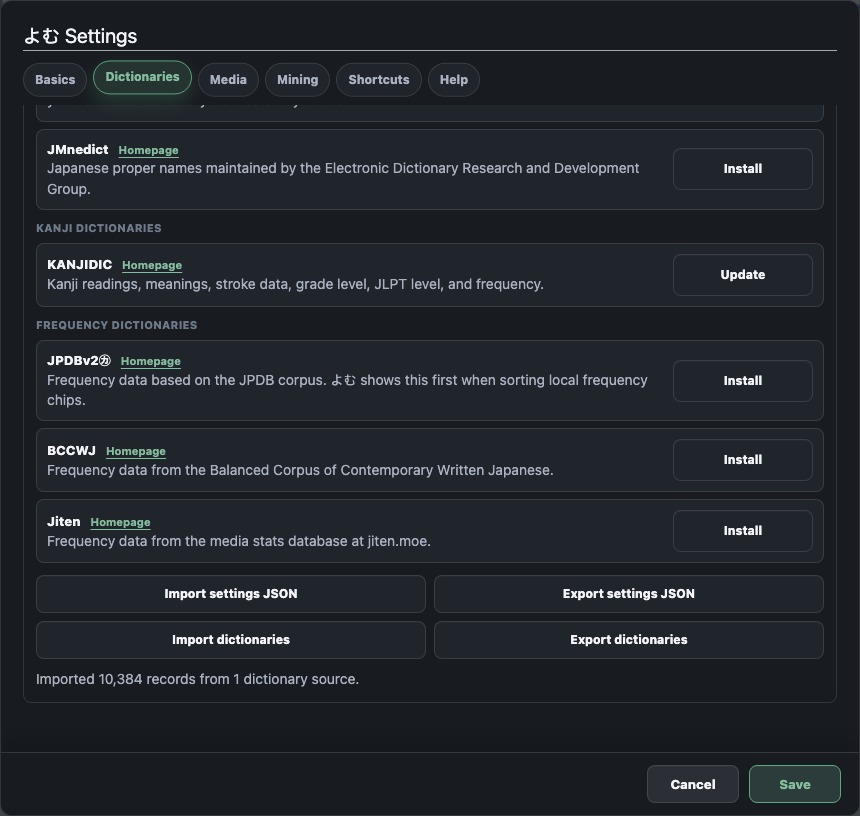
From a single lookup popup, よむ lets you:
- Use Yomitan dictionaries locally. Import your Yomitan dictionary ZIPs or JMdict; the dictionaries stay in your browser and power instant definitions, with no upload anywhere.
- Use Jiten as a study source. Connect Jiten for word state, definitions, audio, kanji facts, and mining or grading actions from the popup.
- See and act on JPDB state. The popup shows a word's JPDB state; add the word, mark it never-forget, blacklist it, or send a review grade.
- Mine to Anki via AnkiConnect. Turn a lookup, subtitle line, or OCR result into an Anki card with the word, reading, meaning, source sentence, audio, and an optional image.
All in one popup, so you adopt the tools gradually: read with the dictionary first, add Jiten or JPDB for structured reviews, and bring in Anki for cards you own.
A reasonable starting point for most people: import a dictionary so reading is comfortable, then pick one study target — Jiten or JPDB for speed, Anki for control — and only add another later if you actually miss it.
FAQ
What is Yomitan and is it the same as an SRS?
No — Yomitan is a free, open-source popup dictionary for instant lookups, not a spaced-repetition system; it shows meanings but does not schedule reviews. See Yomitan above. よむ imports the same dictionary ZIPs to use locally.
Jiten, JPDB, or Anki: which should I pick?
Jiten or JPDB for fast, Japanese-tuned reviews with less setup; Anki for full control over your own cards. See Which to use when above — and many learners use both.
Do I need all four tools?
No. A common combination is a dictionary for lookups plus one SRS for reviews. よむ connects all four from one popup, so you can adopt them gradually.